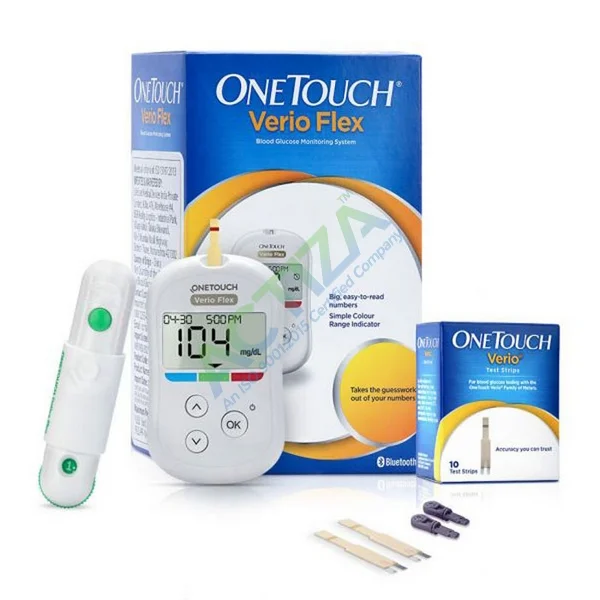
OneTouch Verio Flex is a home blood glucose meter from LifeScan.
OneTouch Ultra measures glucose in a fresh drop of fingertip blood.
The result appears in about five seconds on a backlit screen.
It needs only 0.4 microlitres of blood per test.
A colour Range Indicator shows if the result is in range.
Blue means below range. Green means in range. Red means above range.
LifeScan markets this feature as ColourSure technology.
The meter stores 500 results with date and time.
Bluetooth sends results to the free OneTouch Reveal app.
It is intended for people already diagnosed with diabetes.
Healthcare professionals may also use it for single-patient testing.
HOW IT WORKS (MECHANISM OF ACTION)
Blood is drawn into the strip channel by capillary action.
The enzyme FAD-GDH reacts with glucose in the sample.
Electrons released by that reaction pass to a chemical mediator.
The mediator is potassium ferricyanide, which carries the charge.
The meter applies a small voltage across the strip electrodes.
A current flows in proportion to the glucose concentration.
The meter measures that current and calculates the result.
The number is reported as a plasma-equivalent glucose value.
The Range Indicator then compares it with your set limits.
What is on each strip
Component
Amount per strip
Role
Flavin adenine dinucleotide glucose dehydrogenase (FAD-GDH), from Aspergillus sp.
2 U
Reacts with glucose
Potassium ferricyanide
41 micrograms
Carries electrons to the electrode
Why the chemistry matters to the buyer
FAD-GDH is not the same enzyme as in OneTouch Ultra strips.
OneTouch Verio strips use glucose oxidase with a ferricyanide mediator.
The two chemistries have different interference profiles.
Paracetamol and vitamin C are not listed as Verio interferents.
Do not copy interference text from an Ultra strip page here.
SPECIFICATIONS AND TESTING FREQUENCY (REPLACES DOSAGE GUIDE)
Meter and strip specifications
Specification
Figure
Blood sample volume
0.4 microlitres (minimum)
Test time
5 seconds (meter counts down 5 to 1)
Reporting range
20 to 600 mg/dL (1.1 to 33.3 mmol/L)
Sample type
Fresh capillary whole blood
Approved test site
Fingertip only
Calibration
Plasma-equivalent
Haematocrit range
20% to 60%
Memory
500 test results with date and time
Battery
One CR2032 lithium coin cell, 3.0 V DC
Rechargeable batteries
Not permitted
Operating temperature
6 C to 44 C
Operating humidity
10% to 90% relative, non-condensing
Operating altitude
Up to 3,048 metres (10,000 feet)
Strip storage temperature
5 C to 30 C; do not refrigerate
Strip vial life after opening
6 months
Bluetooth frequency
2.4 to 2.4835 GHz
Bluetooth range
At least 8 metres, unobstructed
Bluetooth security
128-bit AES encryption
Approximate size
52 x 86 x 16 mm (2.05 x 3.38 x 0.63 inches)
Control solution
OneTouch Verio Mid Control Solution
Note on temperature: the owner’s booklet gives 6 C to 44 C as the meter operating range. The US GUDID record lists handling at 10 C to 40 C. Follow the figure printed in the booklet supplied with your meter.
Range Indicator limits
Limit
Factory default
Can be set between
Low range limit
70 mg/dL (4.0 mmol/L)
3.3 to 6.1 mmol/L (about 60 to 110 mg/dL)
High range limit
180 mg/dL (10.0 mmol/L)
5.0 to 16.7 mmol/L (about 90 to 300 mg/dL)
Only your doctor should change these two limits.
Pregnancy, children and older adults often need different limits.
The colour arrow is a guide, not a treatment instruction.
Testing frequency is set by your doctor, not by the meter.
It depends on your treatment, your control and your risk of hypoglycaemia.
People on insulin usually test more often than people on tablets.
Common testing points are before meals and two hours after meals.
Extra tests are advised during illness, fasting, travel or dose changes.
Record every result so your doctor can see the pattern.
HOW TO PERFORM A TEST (REPLACES HOW TO TAKE IT)
First-time setup
Press and hold the OK button until the start-up screen appears.
Set the hour, then the minutes, then AM or PM.
Set the year, then the month, then the day.
Setup is complete when a screen with three dashes appears.
Wash your hands with soap and warm water, then dry them.
Gather the meter, a Verio strip, the lancing device and a lancet.
Load a new sterile lancet into the OneTouch Delica Plus device.
Insert a strip with the gold side and two silver prongs facing you.
Push the strip in firmly until it stops; the meter switches on.
Lance the side of a fingertip, which hurts less than the pad.
Squeeze gently to form a single round drop of blood.
Touch the drop to the channel on either edge of the strip.
Hold still until the channel fills completely and turns red.
The meter counts down from 5 to 1.
Read the result and note the colour of the Range Indicator arrow.
Remove the strip and discard it safely with the used lancet.
Record the result, or sync it to the OneTouch Reveal app.
Pairing with the OneTouch Reveal app
Install OneTouch Reveal on your phone or tablet.
Press the two arrow buttons together to turn Bluetooth on.
Enter the PIN shown on the meter screen when your phone asks.
The app then pulls results across automatically.
Bluetooth switches off automatically during a blood glucose test.
The app is available for iOS, Android, Windows and Mac.
Never use it if PAM (pralidoxime) may be in the blood.
Never test within 24 hours of a D-xylose absorption test.
Never use blood glucose meters to manage critically ill patients.
Never share the meter or lancing device with another person.
Never use a rechargeable battery in this meter.
Never use strips after the expiry date on the vial.
Never use strips more than 6 months after opening the vial.
Conditions to disclose to your doctor before relying on this meter
Anaemia or any condition that lowers your haematocrit below 20%.
Polycythaemia or any condition raising haematocrit above 60%.
Recent severe diarrhoea, vomiting or other cause of dehydration.
Shock, very low blood pressure or a hyperosmolar state.
Gout or known high blood uric acid.
Treatment with tolazamide.
Any planned D-xylose absorption test.
Pregnancy, since target glucose limits are tighter in pregnancy.
Use in a child, so the limits are set for their age.
Poor eyesight or colour blindness, which affects reading the arrow.
Why this matters: each of these can shift the reading away from the true glucose value, or change the range you should be aiming for.
Food, drink and hand-hygiene precautions
Wash hands with soap and water before every test.
Dry hands fully, because water dilutes the blood drop.
Sugar left on fingers from fruit or sweets causes falsely high readings.
Do not test straight after peeling fruit or handling juice.
Do not use hand cream or sanitiser gel just before testing.
A fasting test means no food for 8 to 12 hours, usually overnight.
A post-meal test is normally taken two hours after eating starts.
Alcohol can cause delayed low glucose, so follow your doctor’s advice.
Caffeine, large meals and illness all shift results; note the context.
The fasting definition above is the NIDDK dictionary definition: “after not eating for 8-12 hours, usually overnight”. Testing times should be confirmed with your own doctor.
Before-use safety checklist
Is the strip carton labelled OneTouch Verio, not Select Plus or Ultra?
Is the strip vial within its printed expiry date?
Was the vial opened less than 6 months ago?
Was the vial cap closed tightly after the last test?
Is the room temperature between 6 C and 44 C?
Are the meter date and time correct?
Has the battery low symbol appeared on the screen?
Are the low and high range limits the ones your doctor set?
Is a brand new sterile lancet loaded in the lancing device?
Are your hands washed, rinsed and completely dry?
Do you have fast-acting glucose nearby in case of a low result?
CAUSES OF INACCURATE READINGS
A meter has no side effects. The real risk is a wrong number acted on. The table separates common causes from less common ones.
Common causes
Cause
Effect on the reading
What to do
Sugar or juice left on the finger
Falsely high
Wash and dry hands, then retest
Wet finger after washing
Falsely low (dilution)
Dry the finger fully and retest
Too little blood in the channel
Error code or no result
Repeat with a new strip
Adding more blood after the countdown starts
Unreliable result
Discard and repeat with a new strip
Strip vial left open
Unreliable result
Close the cap at once; discard a damp vial
Strip used after the 6-month open-vial limit
Unreliable result
Discard the vial and open a fresh one
Strip used after the printed expiry date
Unreliable result
Discard the vial
Testing outside 6 C to 44 C
Unreliable result
Move to normal room temperature
Testing at the palm or forearm
Not evaluated by the maker
Use the fingertip only
Low battery
Test may not complete
Fit a new CR2032 cell
Wrong date or time set
Correct value, wrong record
Reset the clock in the meter menu
Less common but more serious causes
Cause
Effect on the reading
Why it is dangerous
Haematocrit below 20%, as in anaemia
Falsely HIGH
A falsely high number can prompt extra insulin and cause hypoglycaemia
Haematocrit above 60%, as in polycythaemia
Falsely LOW
A falsely low number can delay treatment of real hyperglycaemia
Severe dehydration, shock or hyperosmolar state
Falsely LOW
The patient is already unwell and needs laboratory testing
Uric acid above 8 mg/dL
Falsely LOW
Masks true hyperglycaemia
Tolazamide above 10.8 mg/dL
Interference
Result cannot be trusted
D-xylose test in the last 24 hours
Falsely HIGH
May prompt unnecessary insulin
PAM (pralidoxime) in the blood
Result invalid
Meter must not be used at all
Critical illness or poor peripheral circulation
Unreliable result
Capillary testing is not valid in these patients
Altitude above 3,048 metres
Outside the tested range
Accuracy is not assured
Manufacturer wording: “A hematocrit that is either very high (above 60%) or very low (below 20%) can cause false results.” And: “Test results may be falsely low if the patient is severely dehydrated, in shock or in a hyperosmolar state.”
INTERFERING SUBSTANCES – AVOID WITH (REPLACES DRUG INTERACTIONS)
Substance or test
Documented effect
Instruction
PAM (pralidoxime)
Result invalid
Do not use the meter if PAM is known or suspected
D-xylose absorption test
Inaccurately high results
Do not test for 24 hours after the D-xylose test
Uric acid, above 8 mg/dL
Inaccurately low results
Tell your doctor; confirm with a laboratory test
Tolazamide, above 10.8 mg/dL
Interference
Tell your doctor; confirm with a laboratory test
Important difference from OneTouch Ultra strips
Verio strips use FAD-GDH, not glucose oxidase.
Paracetamol is not listed as an interferent for Verio strips.
Salicylates and vitamin C are not listed for Verio strips either.
Those three are listed on the OneTouch Ultra strip insert.
Keep the two product pages separate to avoid a copy-paste error.
This states what the Verio insert and the FDA summary list. It is not a claim that no other substance can interfere. Always confirm against the insert in the pack you receive.
EMERGENCY WARNING SIGNS
What the meter itself warns about
Meter display
Meaning
Action
LO
Glucose below 20 mg/dL (1.1 mmol/L)
Possible severe hypoglycaemia; treat immediately and get help
HI
Glucose above 600 mg/dL (33.3 mmol/L)
Possible severe hyperglycaemia; contact your doctor immediately
The meter shows LO or HI.
You feel unwell but the meter says you are in range.
You feel well but the meter shows a dangerous result.
A repeat test on a new strip gives the same extreme result.
A low result does not improve after taking fast-acting glucose.
You are vomiting and cannot keep food or fluid down.
You are drowsy, confused or breathing fast with high readings.
Someone with diabetes becomes unconscious or has a seizure.
WHY CHOOSE ONETOUCH VERIO FLEX
Measured performance, not marketing
Accuracy measure
Result reported to FDA
Glucose below 75 mg/dL, lab operators
69 of 69 results (100%) within plus or minus 15 mg/dL
Glucose 75 mg/dL and above, lab operators
226 of 231 results (97.8%) within plus or minus 15%
Glucose below 75 mg/dL, lay users
19 of 20 results (95%) within tolerance
Glucose 75 mg/dL and above, lay users
161 of 169 results (95.3%) within tolerance
Figures are from the US FDA 510(k) decision summary for the OneTouch Verio system, K131363. The lay-user study included 189 participants.
Practical advantages
Only 0.4 microlitres of blood is needed per test.
The result appears in about 5 seconds.
Blood can be applied to either edge of the strip.
The colour arrow removes guesswork about the number.
The meter holds 500 results, enough for months of testing.
Bluetooth sends results to a phone without cables.
The design is slim and fits easily in a pocket or bag.
It runs on one common CR2032 coin cell.
LifeScan gives a three-year guarantee against manufacturing defects.
Haematocrit tolerance is 20% to 60%, wider than older strip systems.
9 of 10 users agreed the colour indicator helped interpret readings.
7 of 10 users agreed it could encourage testing as recommended.
STORAGE, CLEANING AND DISPOSAL
Storing the meter
Keep the meter between 6 C and 44 C during use.
Keep humidity between 10% and 90%, non-condensing.
Do not use the meter above 3,048 metres altitude.
Keep it in the supplied carry case to avoid knocks and dust.
Keep it out of direct sunlight and away from car dashboards.
Do not let liquid or dust enter the strip port or data port.
Store Verio strips between 5 C and 30 C.
Do not refrigerate and do not freeze the strips.
Close the vial cap tightly straight after taking a strip.
Write the opening date on the vial label.
Discard the vial 6 months after you first open it.
Keep strips in their original vial only.
Bleach must be at least 5.5% sodium hypochlorite.
A 0.55% hypochlorite wipe may be used instead.
Never pour or spray liquid directly onto the meter.
Treat used strips and lancets as biohazardous waste.
Put used lancets in a puncture-proof sharps container.
Never put loose lancets in household rubbish.
Follow local rules for disposing of the battery and meter.
Licensed pharmacist (B.Pharm) with 12+ years in clinical pharmacy and patient care. Reviews every article for evidence-based accuracy before it is published on ACTIZA Store.
Reviews
There are no reviews yet.
Be the first to review “OneTouch Verio Flex” Cancel reply



Reviews
There are no reviews yet.